How we set up an AI-enabled hub for the Responsible GenAI workshop
This summer, we participated in the Responsible GenAI for NASA Earthdata workshop, a community gathering to explore how others were using GenAI in their workflows across the NASA community, and share best practices.
As part of this work, we worked with Tasha Snow to set up an environment on the CryoCloud hub that allowed attendees to access and experiment with a few different LLM workflows with Earth data.
This is a short post to describe some of the decisions we made, how we set it up, and what we’d like to improve or do differently next time1.
Setting up a hub environment for community LLM use is very much still a work in progress! Don’t treat it as a “best practices” post, more like a “here’s one pattern to consider” post.
Tools and services that hub users could access #
Here’s a quick description of what each user on the hub had access to:
- Two coding agents ready to use in the terminal: Claude Code and opencode. (Codex was installed too, but we didn’t use it in the workshop so we’re not sure if it was set up properly!)
- A pre-release of Jupyter AI 3.2, for chatting with opencode inside JupyterLab (thanks to David Qiu for doing some rapid pre-releasing during the event!).
- Claude models, through a personal API key from UW eScience for each participant (using
llmoxie, more on this below). - Open-weights models served by the National Research Platform (NRP) and preconfigured in opencode.
- The
mothershipCLI, for Mike Jacobi’s hands-on tutorial on agent sandboxing and evals.
How the user environment was set up #
The environment is a Docker image built from CryoInTheCloud/image-cryo-python-AI.2
These two files do most of the setup for various LLM workflows:
.binder/postBuildinstalls Claude Code, Codex, and the ACP bridge withnpm.appendixinstalls opencode, thegcloudCLI,mothership, and the Jupyter AI pre-release.
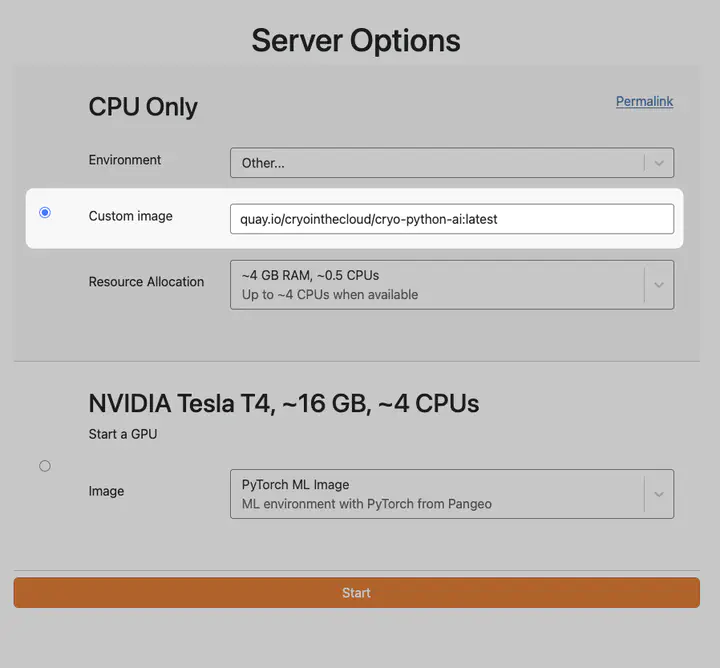
We used a GitHub Actions workflow to build the image and push it to a Docker image registry so that it could be used by the hub. We then asked users to specify this image when they launched their user sessions.3
Throughout the workshop we made changes to the repository that built this image. CI/CD jobs in a PR checked that each change built properly. After merging the new image was automatically pushed to the registry so users got the changes when they re-launched their sessions. For example, here’s a PR that upgraded Jupyter AI in the middle of the workshop.
How users accessed LLM models #
There were two model inference services that we used. Here’s a quick breakdown of these, and how we gave users access to them.
NRP #
For the NRP models, we added a single API key to the hub.4 This pull request to 2i2c’s infrastructure repository added two things to every user server:
- An
opencode.jsonfile that points opencode at NRP’s inference endpoint and lists its models. - The NRP API key, stored encrypted in the repository and exposed to users as the
OPENAI_API_KEYenvironment variable.
This allowed the event participants to use NRP models without setting anything up themselves!
Claude #
Claude access came through the UW eScience Institute, which has model access through an allocation from NSF CloudBank.
UW eScience e-mailed each participant their own API key for a LiteLLM proxy called llmoxie, which is a service run by UW.
On the hub, participants ran a small setup script from a shared folder that configured Claude Code to use the proxy with their key (see a version of this script from UW, and its README for more information).
What we’d like to improve #
Both approaches worked for a short workshop, but each has problems we’d want to fix before using them on a long-running hub.
- The shared NRP key was visible to every user. Anyone on the hub could read it from their environment, and potentially take it off the hub. This isn’t a big deal for a workshop, since you can just recycle (or revoke) the keys once it’s over, but it’s a bigger risk for long-running infrastructure. It also meant we couldn’t track any per-user or per-group usage, since it’s just one token used by everybody.
- The per-user Claude keys took manual work. For Claude, we used the
llmoxieservice, but this required a manual e-mail step + running a Python script on the hub to connect their local Claude Code to thellmoxieservice. This service also might not be usable by other communities that are outside of the UW ecosystem (we need to double check this).
We’ve written up an initiative to improve this5.
It is essentially a “credential proxy service” for JupyterHub that would connect to either llmoxie or a per-cluster service like llmoxie that we could run for communities.
It would allow communities to access inference servers using the authentication from their hub’s user session , without needing to duplicate or expose API keys.
Let us know if this idea sounds useful!
Until then, beware if you follow a pattern like this for exposing an inference service API to your hub users!
Acknowledgements #
- Thanks to Tasha Snow for pulling this together, to David Qiu for the Jupyter AI updates, to Min RK for the first LLM tooling, and to Scott Henderson and Anshul Tambay for handling the Claude keys.
- Thanks to the CryoCloud community for letting us experiment on their hub, and to NASA’s Office of Data Science and Informatics (ODSI) and Earth Science Data Systems (ESDS) program for supporting the workshop.
- Thanks to the UW eScience Institute for hosting the workshop and providing Claude access.
- Finally, much of the cloud and the LLM infrastructure was funded or operated by external sources: the NRP and CloudBank are funded by the National Science Foundation, and UW SSEC’s LLM proxy was developed with support from the NSF NAIRR Pilot and Schmidt Sciences Virtual Institutes for Scientific Software program.
Note: we already wrote up some reflections from the workshop that are more general. This one is focused on infrastructure and environment setup. ↩︎
If you’d rather build your own image from scratch, Tasha’s image template is a minimal starting point. ↩︎
We could have added this to the drop-down list of user environments, but opted not to because there were some security considerations that made us not want to unleash this image on everybody on the hub, just those at the workshop :-). ↩︎
Both are adapted from the BIDS demo hub, which is another good example to learn from. ↩︎
There’s actually already an initiative in the JupyterHub roadmap for the hub proxy service as well! ↩︎
Thanks for reading! If you'd like to follow our work, join our mailing list or subscribe to our blog. You can read our community hub documentation or learn about membership.